“mini chat online”
Usually this means: can I do it without installing anything? Yes — this page is the product. You are already where the mini chat happens. There is nothing further to download and no store page to visit first.
 Minichat TVOpen a mini chat
Mini chat · video call · in your browser
A mini chat is exactly as long as it needs to be. Press once, and you are on video with one woman who is on the platform right now. No app, no registration form, free to start — and you see the per-minute rate before a single coin moves.
Open a mini chat Free to startAdults only · camera and mic · leave whenever



Real profiles from the platform, so this page is not a pure abstraction. Who you actually end up with is the match's decision — there is no menu to pick from, and that is on purpose.
Michi Colombia Mía VenezuelaSaris ColombiaAle Peru
 Ruby Syria
 Vicky Venezuela
A mini chat is a short video call with one person you have not met. It starts in one tap and it ends whenever either of you decides it has run its course. That is the whole category, and the word mini is doing real work in it: this is not a scheduled call, not a group room, not a profile you swipe past hoping for a reply next Tuesday.
Minichat TV is one of those. You open minichat.tv, the browser asks for your camera and your microphone, you press the button, and a woman appears. If the conversation is good you keep going. If it is not, you move on, and nobody has to be polite about it. Most calls here are short. A few are not, and those are the reason people keep the tab around.
It is worth being clear about what that costs you, because the honest answer is some of your attention and none of your identity: there is no profile to assemble before you are allowed to start, no questionnaire about what you are looking for, no waiting period while something invisible decides whether you are worth matching, and no trail of half-finished conversations sitting in an inbox tomorrow morning reminding you that you were on a video chat site last night. You arrive. You talk. You close the tab.
Five things, and the whole sequence takes less time to do than to read about.

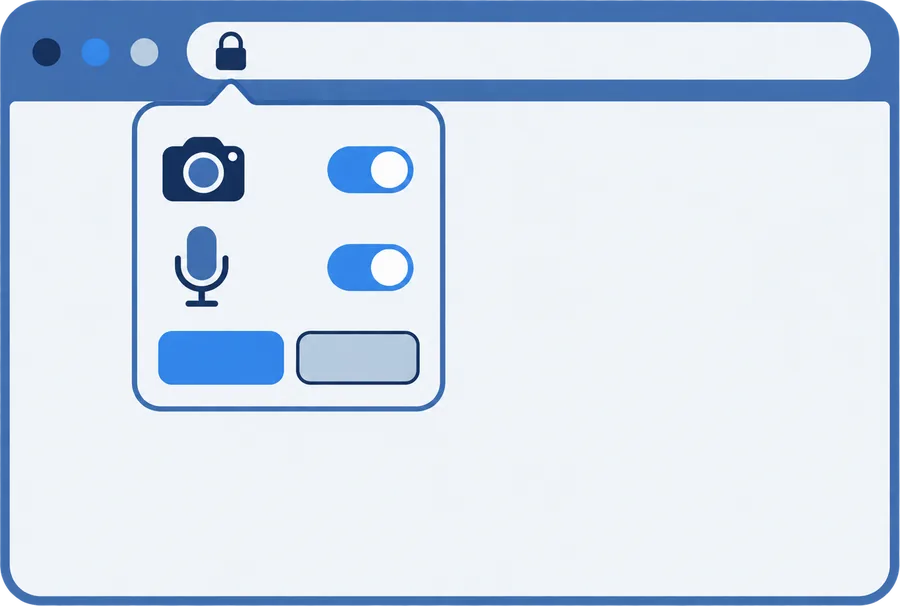
A small permission bar drops down from the top of the window. Nothing has started yet. Until you tap Allow, the page is just a page — no video goes anywhere, and the person on the other end does not exist yet. Both permissions are needed, not one: a mini chat without sound is two people waving.
That is the whole entry. There is no form asking for an email, no password to invent, no code texted to your phone. You get signed in quietly as a guest in the background so the call has somewhere to live, and that is it.
One person. Not a grid, not a lobby, not a list of thumbnails to browse. Her video takes the frame and yours sits in the corner. This is the moment the whole site is built around, and it is also the moment most people freeze, so there is a section further down about the first thirty seconds.
Say something. If the words are not coming, there is text alongside the video, and plenty of conversations start there before anyone says a word out loud. Either way it is the two of you.
Next puts a short countdown on screen and then moves you to someone else. Staying requires doing nothing at all. You can also just hang up — the button is always there, and you never owe anyone an exit line.
The phrase arrives here spelled half a dozen ways, and the thing behind each spelling is not always the same. Here is what each one usually turns out to mean, and whether this site is the answer to it.
Usually this means: can I do it without installing anything? Yes — this page is the product. You are already where the mini chat happens. There is nothing further to download and no store page to visit first.
Same question, phrased by someone who has met an app wall before and is checking whether a browser version exists. Minichat TV only exists as a browser version. Chrome, Safari, Edge, Firefox — whatever you already have open.
Video is the default here, not a feature you switch on. When a call connects you are on camera and so is she. Text rides along beside it for the moments when typing is easier than talking.
There is nothing to log into on the way in. A guest session is created for you so the call has an identity to attach to, and you never see a sign-in screen. If you later top up a balance, that is when having a real account starts to matter.
We do not ship one. If your phone offers to add Minichat TV to your home screen, that is the browser offering a shortcut to this site, not an install. Tapping it opens the same pages.
That is us. The tv is in the name because the thing you look at is a moving picture of a person, and because minichat.tv was the address that was free. No more romantic than that.
There is more than one thing in the world called some version of mini chat, and at least one of them is a well-known app with its own company behind it. We are not it. Minichat TV lives at minichat.tv, it is operated independently, and it is not a web edition, a mirror, or an official anything of another product.
We say this plainly because the alternative is letting you find out later. If you came here looking for a specific app you have used before, this is probably not that app — and the honest move is to tell you now rather than after you have allowed camera access. If what you wanted was simply a mini chat that opens in a browser, you are in the right place.
Any names belonging to other companies are theirs. We use them, where we use them at all, only to say which things are different from each other.
No paywall stands between this page and your first call. You will not be asked for a card to look around, and there is no trial that quietly becomes a subscription.
A matched call begins without charging you. This is deliberate: deciding whether a random video call is worth money is impossible before you have been in one.
When the free part runs out, a prompt tells you the per-minute price in coins. You read the number, then you choose. Nothing is deducted behind your back, and declining it just ends the call.
We deliberately do not print a coin figure on this page. Prices change, marketing pages do not get updated at the same moment, and a stale number here would be worse than no number — the screen in front of you at the time is the one that counts.
Nothing to install means the browser is doing all the work, which also means the browser is where things go wrong. Four of the five problems below are permissions.
Chrome on Android and desktop is the smoothest. Safari on iPhone and Mac works. Edge and Firefox work. The thing that breaks a call is almost never the brand of browser — it is an old version, or a private window with media permissions switched off, or an extension that blocks camera access on every site by default.
Hold it in portrait and prop it against something. Two hands free makes a visible difference to how a conversation goes, and nobody enjoys a call filmed from below.
The built-in camera is fine. The built-in microphone is usually the weak link, especially if the fan is running. If you have earbuds in a drawer, use them.
Something else already has it. Close the other tab or app holding the camera, then reload. If the permission bar never appeared at all, you probably denied it once before: open the padlock icon in the address bar and set camera and microphone back to Allow for this site.
Check that the browser got microphone permission and not just camera — they are granted separately and it is easy to approve one. After that, check the input device in your system sound settings. Bluetooth headphones that are connected to a phone in another room are a surprisingly common culprit.
Real women using the platform, from a lot of different places, awake at a lot of different hours. That is the honest version. We are not going to tell you how many there are, because any figure we printed would be a figure you have no way to check, and this page would rather be useful than impressive.
You do not pick. The match does. People split hard on this: some find a browsable list of faces more comfortable, and some find that the moment you are choosing from thumbnails you are shopping rather than talking. A mini chat is built for the second group. There is an online list on the site if you want to see who is around, but the call itself is a match.
What you get out of it depends almost entirely on how you open. The section on the first thirty seconds is further down and it is the most practically useful part of this page.
Time of day changes who is around more than anything else does, and if you only ever open this site at the same hour on the same day of the week you will come away with a very confident and very wrong idea of who uses it — the room at nine on a Tuesday evening and the room at four on a Sunday morning have almost nothing in common except the software. Try a different hour sometime. It reads like a different site.
Open her profile and the report option is there. It is not inside the call window, which trips people up — if something is happening right now, end the call first, then report from the profile. The report goes to the people who run the platform, not to her.
Also on the profile. Blocking is the quieter option and it does not require you to make a case for anything. Use it freely.
Harassment. Threats. Pressuring someone to do something she has said no to. Recording or screenshotting another person without her agreement. Pretending to be someone you are not in order to get something. Any of these can end an account.
This site is for adults. If you are under eighteen, close the tab. If you believe a minor is using the platform, write to us — the address is in the footer and at the bottom of this page.
Because the unit here is small. One call. One other person. However long it holds, and not a minute of obligation after that.
Plenty of ways to meet people online are built on the opposite idea — accumulate matches, maintain streaks, keep a dozen half-conversations warm in case one of them turns into something. That works for some people. It is also exhausting, and it asks you to commit before you know whether there is anything there.
A mini chat asks for nothing. You show up, you are in front of someone, and the question is only whether this particular two minutes is worth a third. Everything on this site is shaped by that: one tap in, one button out, no profile to build first, no inbox waiting for you tomorrow.
There is a second reason, less philosophical. Short is what actually works in a browser. A format that expects you to stay for an hour needs an app, notifications, a reason to come back, and eventually a subscription to justify all of that machinery — whereas a format built around a two-minute call needs none of it, which is why this site can get away with being a single page you open and close without ever asking you to commit to anything at all.
Four things, none of which require you to be interesting.
Face a window or a lamp. A well-lit average face reads as friendly; a dim one reads as a shadow with a voice. This is the single cheapest improvement available to anyone.
"Hey" is a dead end and everyone has heard it four hundred times. Name something: the hour where you are, the weather, the fact that you have no idea what you are doing on here. Specific is interesting. Generic is skippable.
Connections take a moment to settle and faces take a moment to arrange themselves. A lot of people press Next inside two seconds and then wonder why every call feels the same.
Without them her voice goes out of your speaker and back into your microphone, and she hears herself half a second late. It makes a conversation feel broken when nothing is broken.
If you are looking for one person to talk to every evening for the next six months, this is a poor way to find them. Not impossible. Poor. The format is built around moving on, and the people who get the most out of it are the ones who like that.
And if you are hoping for anything explicit, the community rules on this platform do not allow it, so you would be arguing with the product rather than using it.
What it is good for: the twenty minutes where you are bored and would rather talk to a stranger than scroll. Practising a language with someone who has no stake in how badly you do it. Finding out what three in the afternoon looks like somewhere eight time zones away.
And one more thing worth saying out loud, since it is the part nobody puts on a landing page: a fair number of calls go nowhere, end in four seconds, or consist of two people looking at each other waiting for the other one to speak first, and if you treat each of those as a failure you will hate this format within ten minutes — the people who enjoy it are the ones who treat a dud call the way you treat a song you skip, which is to say not at all.
Nobody is keeping score. That is sort of the point.
Video calls are the least forgiving thing you can ask of a weak signal. Three things to know.
Picture quality. The call will go soft and blocky before it goes silent, because sound is the part worth protecting and the connection knows it. If it gets bad enough that neither works, end the call and start another — a fresh match often lands on a better route.
More than scrolling, less than streaming a film. A long session on mobile data is noticeable on a capped plan. Short calls are cheap.
Wifi wins almost always, but not if you are at the far end of the flat from the router with two walls in between — in that situation a decent mobile signal is the better bet, and switching takes ten seconds. Try both. You will know within one call.
The short version. The long version is the privacy policy, and it is linked at the bottom of every page on this site.
Nothing you have to type. No email, no phone number, no name. A guest session gets created so the call has an identity to hang on, and that is the entire price of admission.
Your camera, your microphone, and whatever is behind you. That last one catches people out. Look at your own preview before you press the button and move anything you would rather a stranger did not see.
Paying changes things, because now there is an account worth keeping and a payment handled by the payment provider. The details of what is stored and for how long belong in the privacy policy rather than on a marketing page, and ours is linked in the footer.
Write to us. The address is in the footer. Ask for an account or its data to be removed and say enough that we can find it.
The act of being put with one person. You do not choose and neither does she. It is the core mechanic of the whole category.
The button that ends this call and finds another. A short countdown runs first, which exists so that a mis-tap does not throw away a conversation you were enjoying.
The balance the paid part of a call draws from. You see the per-minute rate on screen before that part starts.
The quiet sign-in that happens for you when you arrive, so that a call can connect without you filling anything in. It is why there is no login screen.
Free to start. The rate shows up on screen before anything is charged, and the exit button is always in reach.
Open a mini chatOr read about meeting new people and meeting women here first.